Articles by "app"
Showing posts with label app. Show all posts
Remote, IT Service, Business email, G Suite, Office 365, Website, Business, Office Network, Intranet, Server, Social Media

 The international version of Hancom Office 2020 does not include Hangul Word Processor (HWP) so if you need to edit HWP files you will need to try the following alternatives:

1) Purchase HWP from Hancom's Korean online store.

It's available in Korean language only and a perpetual license for the home & student edition is available at https://www.hancom.com/goods/subMain.do. Please note that only Korean credit cards are accepted.

More info..


Hancom Office 2020 (with HWP - Korean) Download Link:

https://cdn.hancom.com/pds/hnc/DOWN/HancomSpace/HancomOffice_HancomSpace_ko.exe


Remote, IT Service, Business email, G Suite, Office 365, Website, Business, Office Network, Intranet, Server, Social Media

When you want to use Google search with Microsoft Edge browser,
1 In Microsoft Edge, perform a search in the address bar using the search engine you want to set as your default.
2 Select Settings and more Three-dot More icon > Settings Gear-shaped Settings icon. 
3 Select Privacy and services.
4 Scroll all the way down to the Services section and select Address bar.
5 Choose your preferred search engine from the Search engine used in the address bar menu.


Remote, IT Service, Business email, G Suite, Office 365, Website, Business, Office Network, Intranet, Server, Social Media
The virtual background feature allows you to display an image or video as your background during a Zoom Meeting. This feature works best with a green screen and uniform lighting, to allow Zoom to detect the difference between you and your background. Watch a video about this feature.
( Read More at https://support.zoom.us/hc/en-us/articles/210707503-Virtual-Background)


Download free Zoom background at https://www.shutterstock.com/discover/free-virtual-backgrounds or Google "zoom virtual background free" for more.

PC Requirements
Image only without a physical green screen

Option 1

  • Zoom Desktop Client for PC, version 4.4.53582.0519 or higher
  • Windows 7, 8, or 10 64-bit
  • 4th generation i7 quad-core or higher processor

Option 2

  • Zoom Desktop Client for PC, version 4.5.4 (5422.0930) or higher
  • Windows 10 64-bit
  • 6th generation Intel i5 Dual core or higher processor
  • If CPU is not i7 quadcore or higher, integrated GPU enabled and integrated GPU's graphics driver version 23.20.xx.xxxx or higher
Remote, IT Service, Business email, G Suite, Office 365, Website, Business, Office Network, Intranet, Server, Social Media
1. Open Google Chrome.
2. Click/tap on the More button, and click/tap on Settings


3. Click/tap on Advanced at the bottom.


4. Click/tap on Site settings
5. Click/tap on Notifications


6. Add or Remove notifications accordingly.


Remote, IT Service, Business email, G Suite, Office 365, Website, Business, Office Network, Intranet, Server, Social Media
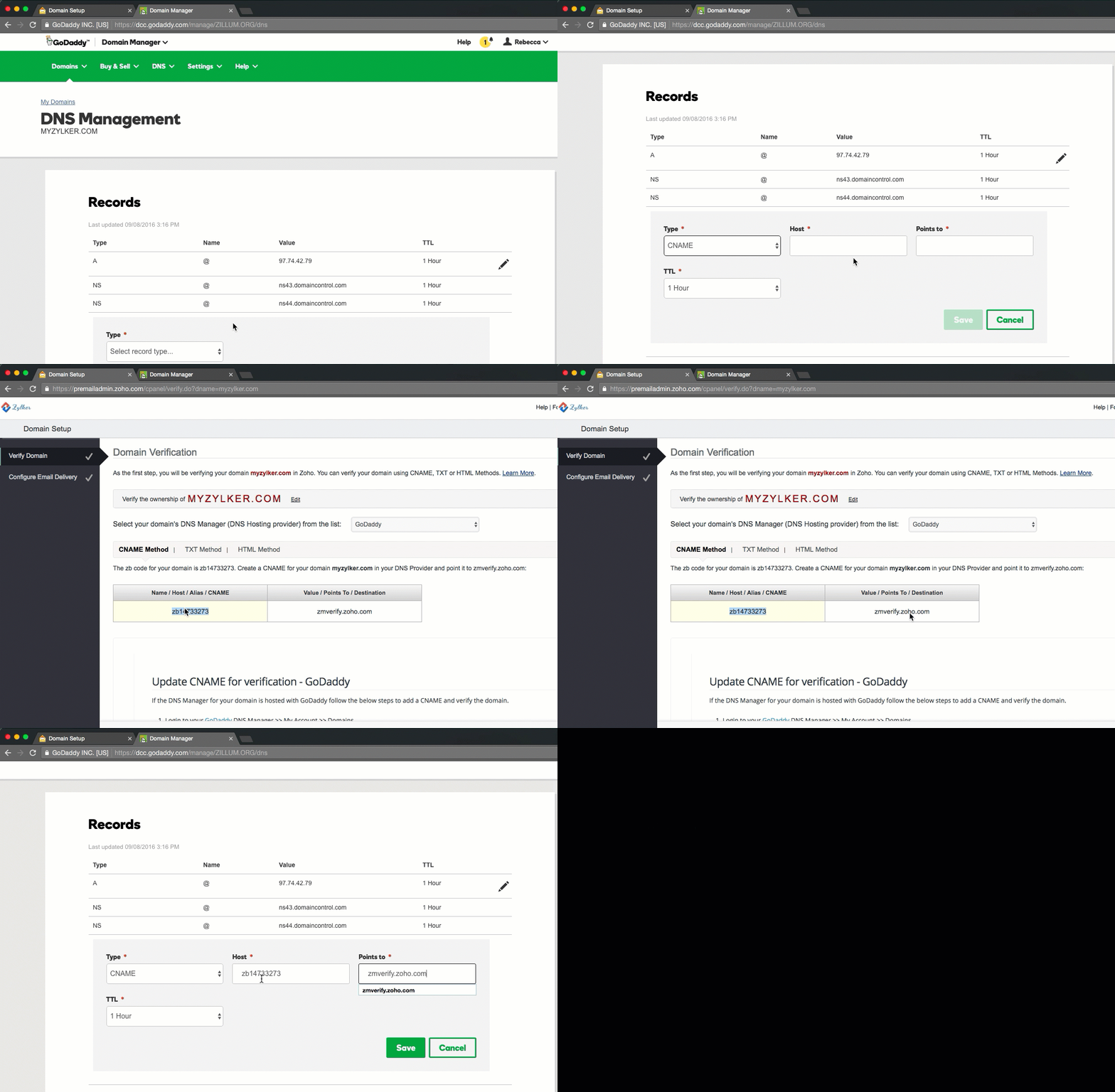
DNS, which stands for domain name system, controls your domain name's website and email settings. When visitors go to your domain name, its DNS settings control which company's server it reaches out to.

For example, if you use GoDaddy's DNS settings, visitors will reach GoDaddy's servers when using your domain name. If you change those settings to user another company's servers, visitors will reach them instead of us when visiting your domain. (More Info..)

Image result for godaddy dns manager
Type of RecordWhat it's forAdd, Change or Delete
A RecordConnects an IP Address to a host nameAddChangeDelete
CNAME RecordAllows more than one DNS name for a hostAddChangeDelete
MX RecordEnsures email is delivered to the right locationAddChangeDelete
NS RecordContains the nameserver infoAddChangeDelete
TXT RecordProvides additional info about a host or more technical info to serversAddChangeDelete
SRV RecordFinds computers that host specific servicesAddChangeDelete
AAAA RecordProvides IP addresses that do not fit a standard A Record formatAddChangeDelete
SPF RecordUsed to help prevent against spamAddChangeDelete
CAA RecordUsed to prevent anyone from obtaining an unauthorized SSL certificate for your domainAddChangeDelete
Remote, IT Service, Business email, G Suite, Office 365, Website, Business, Office Network, Intranet, Server, Social Media


FeedBurner is a web feed management provider launched in 2004. It provides custom RSS feeds and management tools for bloggers, podcasters, and other web-based content publishers. Google acquired FeedBurner in 2007. FeedBurner was founded by Dick Costolo, Eric Lunt, Steve Olechowski, and Matt Shobe


FeedBurner: "The feed does not have subscriptions by email enabled"

How to fix it:

  • Login at http://feedburner.google.com/ and select your feed.
  • Go to the "Publicize" tab:
More info...

Remote, IT Service, Business email, G Suite, Office 365, Website, Business, Office Network, Intranet, Server, Social Media
인터넷에서 찾은 유용한 정보가 가끔 .hwp (한컴오피스 한글) 파일이 이여서 구지 한글뷰어를 컴퓨터에 설치해야하는 번거러움이 있었는데 .... 이제 Online HWP Viewer로 간단하게 해결되네요. 편리한 세상..ㅎㅎ


Remote, IT Service, Business email, G Suite, Office 365, Website, Business, Office Network, Intranet, Server, Social Media

Avoid Tracking With Incognito Mode
: If you don’t want Google Chrome to remember your activity, you can browse the web privately in Incognito mode.

What happens when you browse privately
시크릿 브라우징을 이용하면 어떻게 되나요?
Chrome won't save your browsing history, cookies and site data, or information entered in forms.
Chrome은 인터넷 사용 기록, 쿠키 및 사이트 데이터 또는 양식에 입력된 정보를 저장하지 않습니다
Files you download and bookmarks you create will be kept.
다운로드하는 파일과 생성하는 북마크는 보관됩니다
Your activity isn’t hidden from websites you visit, your employer or school, or your internet service provider.
방문하는 웹사이트, 고용주나 학교 또는 인터넷 서비스 제공업체에는 내 활동이 공개됩니다.

To open an incognito window in Chrome, click the three-dot icon () on the top-right of the browser and select "New incognito window." On mobile, tap the three-dot icon on the bottom-right (iOS) or top-right (Android) and select "New incognito tab."


Remote, IT Service, Business email, G Suite, Office 365, Website, Business, Office Network, Intranet, Server, Social Media


Overview

Compatible with your device

Copy, paste and translate text from any image, video or PDF.
Do you need to extract text from images, videos or PDF? If yes, then the Copyfish free OCR software is for you.

More info..
Remote, IT Service, Business email, G Suite, Office 365, Website, Business, Office Network, Intranet, Server, Social Media


Free Edition
Free backup, disk imaging and cloning solution for commercial and personal use.
Protect your data, upgrade your hard disk or try new operating systems in the safe knowledge that everything is securely saved in an easily recovered backup file. Macrium Reflect supports backup to local, network and USB drives.
Macrium Reflect 7 Free Edition is ready to download now and has a number of additional features not available in version 6. It is now licensed for both home and business use.


Remote, IT Service, Business email, G Suite, Office 365, Website, Business, Office Network, Intranet, Server, Social Media

Here are WordPress hosting companies that offer free SSL certificate with their hosting plans.


Remote, IT Service, Business email, G Suite, Office 365, Website, Business, Office Network, Intranet, Server, Social Media


Remote, IT Service, Business email, G Suite, Office 365, Website, Business, Office Network, Intranet, Server, Social Media


HEIF is based on the High Efficiency Video Compression (HEVC), which is also known as H.265. The format was developed by the Moving Picture Experts Group (MPEG) and became popular in 2017 when iOS 11 and macOS High Sierra was released. In iOS 11 you can save images as HEIC files instead of JPEG files, which require considerably less storage than JPEG files without sacrificing image quality.

If an iPhone user shares a HEIC image with a non-iPhone user or to a social site, the HEIC image is automatically converted to a JPEG image. If you do not want iOS to save images in the HEIF format, open your "Settings" app, and select Camera → Formats → Most Compatible. Selecting Most Compatible means that iOS will now save images in the JPEG format.

Free Convert Tool at https://www.freeconvert.com/heic-to-jpg.

More info...


Remote, IT Service, Business email, G Suite, Office 365, Website, Business, Office Network, Intranet, Server, Social Media

Empower Your Church

Experience the power of open source in your church with worship presentation software designed to fit how you want to run your service. Fast, flexible and easy to use, you will have your service up and running in a few minutes. These features and a whole lot more at a price that can't be beat.


Remote, IT Service, Business email, G Suite, Office 365, Website, Business, Office Network, Intranet, Server, Social Media
요즘 기본적으로 지메일 계정을 개인용, 비즈니스용 등으로 보통 2-3개 정도를 갖고 있습니다.    이렇게 사용하면 보면, 반복적으로 계정을 스위치해야 하는 번거로움도 있고, 사용하는 북마크도 다르고, 특히 회사에서 G-Suite를 사용하면 개인 지메일 계정으로 혼동을 일으킬 때가 자주 있습니다.

크롬 유저 프로파일을 개인용, 비즈니스용으로 따로 분리해 만들어 사용해 보십시요. 북마트, 암호, 히스토리등 크롬브라우저와 관련된 사항들이 모두 분리되어 더이상 계정을 스위치해야 하는 번거로움에서 벗어 날 수 있습니다. 회사 G-Suite 업무도 Really Works Charming!     

Add a person or profile
  • On your computer, open Chrome.
  • At the top right, click Profile.
  • Click Manage people.
  • Click Add person.
  • Choose a name and a photo.
  • Click Save. A new window will open and ask you to turn on sync.
  • (Optional) Turn sync on in Chrome with a Google Account for the new profile. Their bookmarks, history, passwords, and other settings will automatically sync.
  • More info

With profiles, you can keep all your Chrome info separate, like bookmarks, history, passwords, and other settings.

Profiles are ideal for:
  • Keeping your different accounts, like work and personal, separate.
  • Sharing a computer with multiple people.
Create desktop shortcut


Remote, IT Service, Business email, G Suite, Office 365, Website, Business, Office Network, Intranet, Server, Social Media
  • https://ninite.com
  • Install and Update All Your Programs at Once
  • Freeware installation Tools
  • Easy Utility
  • Always Up-to-date
  • Trusted by Millions